RENOVO / FEATURES

Every screen the work
actually runs on.

Renovo is sold as six modules, but it is used as 68 screens across 10 areas — dispatch, claims, payroll, the general ledger and the phone, on one record. This is the whole list, laid out the way the app itself is.

The Renovo dashboard
SEE IT IN ACTION / 01

Recorded in
the real app.

Not a mock-up and not a slide deck — each of these was recorded against the running product.

2:13

Every job you have open — and what each one is making

The job list end to end: twenty-eight jobs across restoration losses, an office fit-out, a bathroom gut and a no-heat call; the eight numbers you act on each morning; the three that are behind the date you promised; the same work read four ways including work in progress. Then one water loss opened up — its phases, its contract value, what is earned and what is still to bill — and a new job raised, scheduled and dispatched to a tech without leaving the page.

2:06

The paperwork that decides who pays for the delay

Renovo's commercial construction surface, for the work that needs a submittal log. Every project you are running and the eight numbers that say where the trouble is; an RFI where a panel lands inside the reception millwork, costed at $4,200 and three days while it sits with the engineer; a glazing package returned revise-and-resubmit because its frame depth contradicts that same RFI; the punch list by trade and location; and the daily log — weather, crew count, trades on site, and the two hours a delivery sat in the rain — written on the day rather than reconstructed a year later.

1:56

The drying record the carrier actually pays against

Restoration, end to end. Nine claims by phase — two still in emergency, two drying, one disputed, nineteen million in coverage behind them — then one loss opened up: category 1 water at class 3 across fourteen units, the equipment on the floor by identifier, and a subfloor tracked from 24.8% toward a 12% dry goal with temperature, humidity and grains per pound beside every reading. It is at 14.6 and will not make goal, so the extension sits with the adjuster and the claim flags itself as drying past the usual five days.

1:52

A name and a number gets you there. It does not get you in.

The commercial record, for all four trades. Twelve customers and the ten service locations behind them, then one property manager opened up: four buildings on a single account, each with the person actually responsible for it; their equipment rather than yours — two rooftop units, a boiler, a duplex sump set, a backflow preventer, with make, model, serial and when each is next due; every job, claim, estimate and invoice against the relationship; and the plan that decides whether their call jumps the queue.

1:46

The cheapest job you will ever win is from someone who already paid you

Email marketing for contractors, which is not brand advertising: it is the customer list you already own, put to work. Thirteen subscribed contacts and what the last month actually did; four campaigns — a furnace tune-up before the cold snap, a storm response the morning after, a backflow reminder scheduled, a spring roof check in draft; and the report on the one that went, as a list of names rather than a percentage, with the A/B subject that won. Plus the half that keeps you legal: who opted out, when, and the addresses that must never be mailed again.

1:52

The invoice always turns up. The question is whether it matches the order.

Subs, suppliers and what they actually cost. Ten trades filed by what they do; $217,975 committed across ten open orders — money promised but not yet billed, one of them already past its delivery date; $69,700 outstanding in payables with one bill overdue; and every order tied to the job that pays for it. Then the one that matters: a $8,960 equipment order billed at $10,200, and the job carrying the $1,240 whether anybody notices or not.

1:51

The ticket that matters is always the one that lapsed last week

The crew, their tickets and where the hours went — filmed as a project manager, which is the point. Eleven people across three departments with one starting, one on leave and one who has left; a superintendent with six jobs open and one compliance item outstanding; certifications and licences with issuer, number and expiry, including a refrigeration licence twelve days gone and a gas ticket with twenty-one left; sixty-four hours against real jobs, approved, pending and one rejected for being booked to the wrong one. And no compensation tab anywhere, because a PM can staff a job and approve the hours without seeing what anybody is paid.

2:27

Books that know which job the money came from

The argument for keeping the ledger here rather than in a package that has never heard of a job. The position in one strip — cash, receivables, what is late, the tax you are holding. A profit and loss whose cost of sales is the one a contractor actually carries: materials, subcontract, equipment rental and $75,300 of direct labour, leaving thirty-six cents of gross margin on the dollar. The general ledger filtered to a single account, where every movement is an invoice. Retainage on its own line of a balance sheet that says Balanced. And the audit that compares your invoice and bill screens against the ledger, document by document — eighteen checked, no difference.

2:03

The work you do not have to sell twice

Recurring revenue, both halves of it. The plans a service company sells — three tiers, the discount and the response time each one buys, and $24,000 a year from six enrolled customers — then the roster of who is on what and until when, including the one whose term ends this month with nothing set to renew it. And the other side of the bargain: nine standing contracts across HVAC, fire alarm, generator, boiler and backflow, each carrying its cadence, its next date, the tech who goes and what the visit is worth. Ending on the two that matter — the visit that was missed, and the one due today.

1:55

Everyone thinks they are your priority

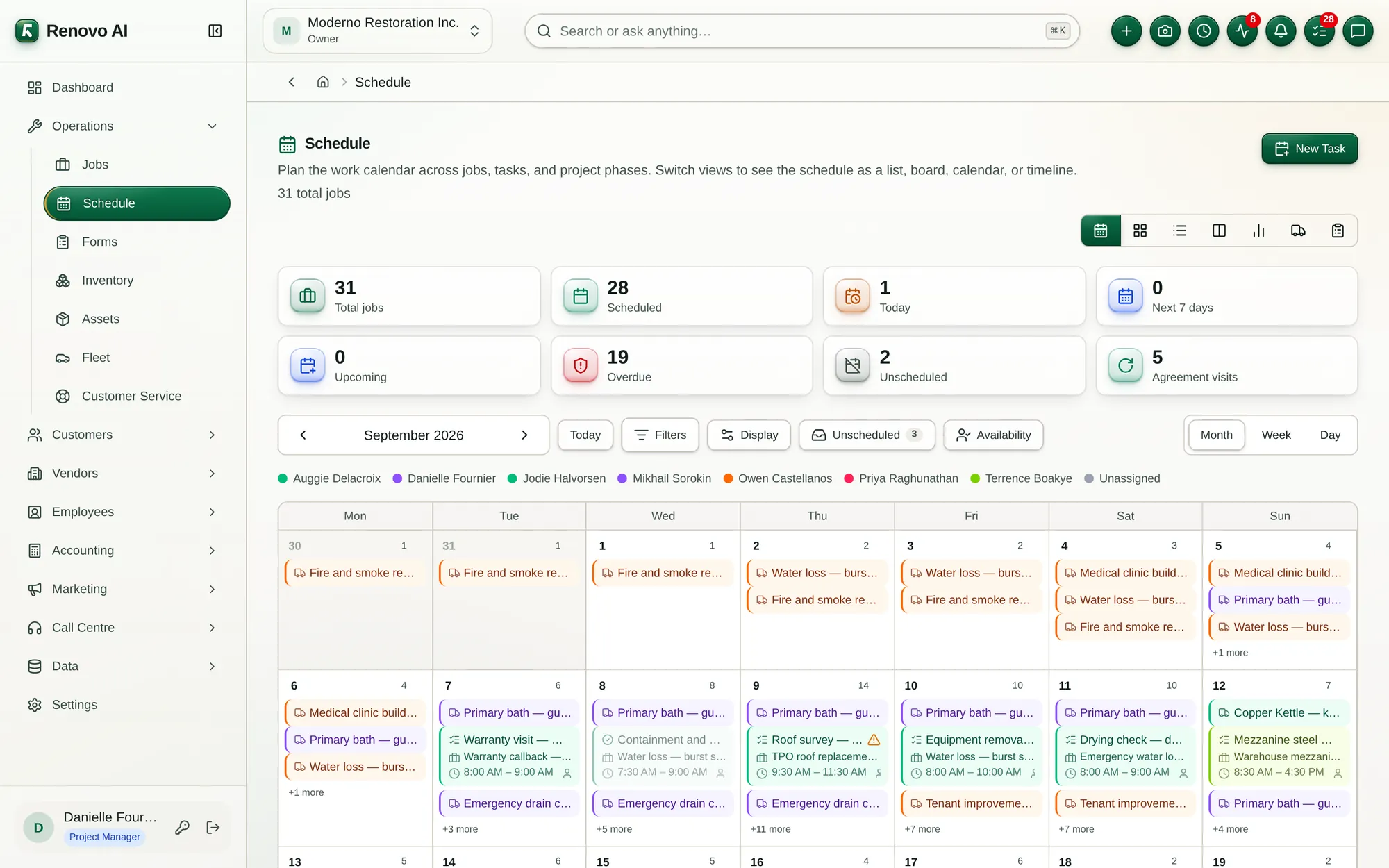
The board a contractor actually runs the day from. Twenty-eight jobs on one calendar — six running today, four already past the date you promised, one repeating every month because a service agreement says so. Then the week the crews work: moisture readings at eight, an emergency extraction at nine, the adjuster at half ten, each block carrying its hours and the name of whoever is going. The same technician booked in two cities at once, flagged on both bookings. The whole job list as a timeline with its phases underneath, or as a spreadsheet with the crew, the duration and the city. And a new visit booked in about the time it took to write it on the whiteboard.

1:45

Send the right one, not the nearest one

The board a service contractor runs the morning from. Eight technicians and what each is actually qualified for — gas and rooftop units on one, framing and steel on another, water damage and mould on a third. Three visits with nobody's name against them, and a board that has already found four things worth sorting, including a job nobody can be sent to because the only plumber on the roster is on leave. Then the ranking: skills first, then how far away, then how full the day already is — ninety-one out of a hundred for the technician 1.7 km from the site. And the whole day on a map, with the crew's last known positions over the top.

1:52

The number between what you spent and what you invoiced

The work-in-progress schedule a bank asks for and most contractors cannot produce. Twelve jobs in progress: $410,710 under contract, $130,548 spent against it, $211,837 earned — and $118,581 invoiced, which leaves $93,256 of work done and not billed for. One job read across, contract to estimate to cost to percent complete to earned; a mezzanine billed fifteen thousand ahead of the work it has done; and a fire job flagged because it has spent every dollar it budgeted. Jobs, projects and claims, filtered to just the overbilled ones, and printable at month end.

1:52

The signature is on a form nobody can find

Every form the crews have filled in, across every job, in one queue: twelve of them — five signed off, four waiting on somebody, two still open on a tablet, and one sent back with the reason printed on the row, so the technician knows what to fix without a phone call. Open one and it is the form itself, not a scan: ten safety items all ticked, the hazards found and what was done about them, locked because the customer has already been sent a copy. A work order with its hours, its materials and two signatures — the technician certifying the work and the customer accepting it. Filter to what is waiting on you, approve it together, hand any of it over as a PDF.

1:40

The van is a stockroom that drives away

Thirteen thousand dollars of parts across a warehouse and five vans, and a board that opens by telling you the two items at zero — refrigerant and a backflow repair kit — and that a job needing either cannot be finished today. Stock grouped by truck, so you see what is on the HVAC van now rather than what the warehouse thinks it sent out. A history where every line names the van, the job and the person: two respirator cartridges out of Van 5 onto the underground parking job, six receptacles off Truck 12 onto the fit-out. A cycle count that came up four filters short, on the record. And twenty-six parts with a cost, a price and a reorder point underneath it all.

1:43

Six dehumidifiers went out. Where are they?

The register of what a restoration contractor owns, which is mostly the kit that earns the day rate: thirty-eight assets, $181,000 of trucks, drying equipment and tools, sixteen pieces of it out on a job right now — not out somewhere, out on THIS one, with the job named on the row. Every unit a real record: tag, make, model, serial number, cost and condition. Filter to what is in the shop and you see the $6,600 of kit that is not earning this week. And it ends where most asset registers cannot: on the balance sheet, where the same money is split into $96,000 of vehicles and $85,000 of equipment, agreeing to the dollar.

1:56

What did the truck cost to run last month?

The trucks, which for most contractors are the second-biggest line after payroll and the one nobody costs. Six vehicles with the eight numbers that say where the money went: $647 of fuel in thirty days, $1,212 of servicing, and two services that were booked and never happened. Every vehicle a record rather than a nickname — a 2021 RAM ProMaster, plate CL 22 6041, 46,930 miles, and the driver holding the keys. Every fill-up carrying the odometer and the price a gallon. Two overdue services named at the top of the page before you scroll, and every finished service carrying the next one. Then the fleet on a map, reported by the crew rather than tracked, and the driver log that puts every mile against a job you can name.

2:15

Two of these went to somebody's mobile and stopped

The two things customers say after the work is done, and what the company is measured on because of it. Eleven complaints, each a record rather than a message — how it arrived, how urgent, who owns it and the job it belongs to — and the second row of numbers that matters: two urgent, two nobody owns, two still without a first reply. Then twelve satisfaction surveys, eight answered, 4.1 out of 5, and the one two-star rating that says exactly what went wrong. The customer's side of the link, filmed signed out: five stars and a comment box, ten seconds. And the scorecard where it lands — customer satisfaction at 87.1, from twenty-two measurements nobody typed.

2:11

You sent a price. Did anybody open it?

An estimate that is a document the customer signs, not a number in an email. Twelve of them across the whole pipeline — $797,421 quoted, $128,795 already won, and every stage from drafting one to turning it into a job, on a board you drag them along. A 22,000 sq ft re-roof with the reason behind every line, locked the moment it was sent. Three membranes at three prices and three upgrades on top. Then the customer's own screen, filmed signed out: they pick the 80-mil, add the twenty-year warranty, and the total moves to $289,790 — priced by the server, with the deposit recalculating behind it. They sign it on the page. And back on your side: who signed, when, from what address, and the price locked at the figure they chose.

1:36

What are you owed this morning?

The register that answers it: $233,615 invoiced, $181,523 outstanding across six unpaid, $52,092 collected and $37,064 now past due. Every invoice against the job it came from, with what it was for and what is still owed on it. Then the two lines a contractor's invoice has that a shop's does not — a share of an approved budget billed as progress, with ten percent held back as retainage until sign-off. Payments land against the invoice rather than beside it, cheque reference and all. And the customer's own copy: the contractor's letterhead, the work itemised, the balance after what they have already paid, and a button to pay the rest by card.

1:23

Which one do you ring first?

The collections desk. $167,511 owed across five invoices — and deliberately not the Invoices page's $181,523, because a draft is billed to nobody yet: the register counts what was raised, this counts what can be chased. $37,064 already late, $48,930 falling due inside a week, and the oldest sitting there sixteen days. Not a report but a call list: who owes it, what they have paid, what is left, and a way to take the money on every line. One click on the overdue figure narrows it to the only conversation you actually have to have. Then what has landed — $52,092 collected, every payment against its invoice with the reference it arrived under.

1:34

Which dehumidifier is in whose basement?

The one surface where goods move rather than money. Nine orders and $24,330 of equipment and materials committed, three waiting on the warehouse and $2,600 of customer deposits held against them. Sales, rentals and mixed orders, each against the job it belongs to — and a lifecycle that is computed rather than picked: draft, approved, part-delivered, delivered, billed, all rolled up from what has actually left the building. Open a hire and every machine is a specific machine: dehumidifiers EQ-DH-01 through 04 and six air movers, out since the 29th at their own day rate. Ordered, reserved, fulfilled and invoiced line by line — the two scrubbers still in the racks are exactly why the order reads part-delivered.

1:22

Two of these were due back on Sunday

The warehouse's view of every hire on the books: 27 of them, 10 machines out right now, four more reserved against work that starts next week, five back, and two that are late. A thousand dollars of customer deposits held while the kit is away — held, not collected, because the money is only on deposit as long as the machine is out. Every row is a specific machine on a named order: the tag, the order number, when it went, when it is due and what it earns a day. One click on the overdue figure and you are looking at an air scrubber and a hydroxyl generator at the retail plaza, due back on the sixth, with $170 of late fee already running against each.

THE WHOLE SURFACE / 02

10 areas,
68 screens.

The same navigation your team gets on day one. A badge marks a screen that needs more than the entry plan; everything unmarked is on every plan, Core included.

01HUB

Dashboard

The day in one screen — and, for a group, the same picture across every company.

  • OverviewMetric tiles grouped by category, over the period you pick — daily through annually.
  • KPIHeadline measures with the benchmarks they are read against.
  • PerformanceThe same measures as a trend rather than a snapshot.
  • Multi-CompanyEvery company you belong to on one screen, with a shared schedule and staff view.
  • My Time OffYour own leave requests, without going through a manager's screen.
  • My ReimbursementsYour own out-of-pocket claims, followed through to payment.
02OPS

Operations

The work itself: what was promised, who is doing it, and what it is costing while it runs.

  • JobsSchedule, track and manage every job from lead to close-out.
  • ClaimsInsurance claims — policyholders, carriers, and settlement progress.Claims and up
  • ProjectsGroup related jobs into projects and track budget, progress and health.Projects and up
  • Service AgreementsMembership plans, enrolled members, and recurring maintenance contracts.Projects and up
  • ScheduleOne shared board for demand, availability, assignments and changing priorities.
  • DispatchThe board the day is run from — technicians, visits, and who takes the next one.
  • WIP ScheduleCost-to-cost work in progress: earned revenue and over/under billing from costs to date.
  • FormsEvery field form across every job — filter, review, and approve or reject in bulk.
  • InventoryParts stock across warehouse, trucks and technicians.Projects and up
  • AssetsCompany equipment and tools — assignments, condition, and service history.Projects and up
  • FleetVehicles, fuel, maintenance, GPS and driver logs across the fleet.Projects and up
  • Customer ServiceComplaints from intake to resolution, and post-job satisfaction ratings.
03REV

Customers

Everything the customer sees, from the first quote through to the money arriving.

  • All CustomersSites, contacts, equipment and the full history behind every relationship.
  • EstimatesPrice up work, send it as a document the customer signs, and track every stage.
  • InvoicesBill customers and track what is still outstanding.
  • PaymentsRecording, reconciliation and follow-up on what has not been paid.
  • Sales OrdersEstimates, sales, rentals and leases — fulfillment and invoicing.
  • RentalsEquipment rented out to customers — rates, availability, and returns.
  • Credit NotesIssue customer credits and apply them against invoices.
04MKT

Marketing

Campaigns to the customers you already have, measured against the work they book.

  • CampaignsSend campaigns to your customers and see who opens, clicks and books.Projects and up
  • AudienceThe contacts your campaigns can reach, and the addresses that must never be emailed.Projects and up
  • Email TemplatesReusable designs your campaigns can start from.Projects and up
05VND

Vendors

The outside half of the work, kept on the same record as the job it belongs to.

  • All VendorsSuppliers and subcontractors — contacts, terms, and spend.
  • Purchase OrdersOrder materials and services from vendors, and track what has been received.Projects and up
  • BillsVendor bills posting to Accounts Payable in the general ledger.
  • Vendor CreditsCredits issued by vendors, reducing Accounts Payable.
  • ExpensesRecord and categorize business expenses across jobs and the company.
06PPL

Employees

The crew, and the cost of the crew, landing on the job while it can still be acted on.

  • All EmployeesThe workforce record — profiles, pay, documents, and time off.
  • TimesheetsTrack hours, approve time, and prepare for payroll.
  • Process PayrollTurn approved timesheet hours into payroll runs, then process them to mark employees paid.Projects and up
  • Employee BonusesAward and track one-off bonuses, then mark them paid when disbursed.Projects and up
  • Sales CommissionsCommissions earned by employees and partners on referrals and jobs, then paid out.Projects and up
  • ReimbursementsOut-of-pocket employee expenses, mirrored as bills against a reimbursements payable account.
07TEL

Call Centre

The phone answered and written down, so a call becomes a record rather than a memory.

  • Call CentreAI-handled phone calls, voicemails, and follow-ups in one place.Claims and up
  • CallsEvery inbound and outbound call handled by the call centre.Claims and up
  • VoicemailsMessages left by callers when no one was available.Claims and up
08FIN

Accounting

A double-entry core fed by the work rather than reconstructed from it afterwards.

  • Financial OverviewEvery zone of the business, laid out from first contact to money in the bank.
  • Chart of AccountsThe account structure behind your double-entry ledger.
  • Journal EntriesManual double-entry adjustments to the general ledger.
  • General LedgerEvery posted movement, plus the trial balance that proves the books balance.
  • Profit & LossIncome and expenses over a period, computed directly from the ledger.
  • Balance SheetAssets, liabilities and equity at a point in time, tied to the ledger.
  • Cash FlowCash movement by operating, investing and financing activity.
  • Accounts ReceivableAging and customer statements, computed directly from the general ledger.
  • Accounts PayableAging and vendor statements, computed directly from the general ledger.
  • Cheque PrintingPay vendor bills by printed cheque — every cheque posts straight to the ledger.
  • Tax PaymentsRemittances to each authority for a period, posted against the liability they clear.
  • BankingEvery bank, cash and credit-card account with its live balance and reconciliation status.
  • Bank ReconciliationReconcile an account against its statement, line by line.
  • Accounting SettingsFiscal calendar, accounting basis, and the default accounts automated postings hit.
09DAT

Data

Everything filed, and everything measurable, without exporting it somewhere else first.

  • File RepositoryBrowse, search and tag every file in the system from one place.
  • ReportsRun, export and schedule financial and operational reports across the business.
  • DocumentsPolicies, procedures, manuals and contracts, with versions, approvals, expiry and acknowledgements.
10CFG

Settings

The parts you configure once, and the switches that decide what everyone else sees.

  • User ManagementLogins, roles and invitations.
  • Roles & SecurityCustom security roles and module-level permissions.
  • Modules & TerminologySwitch modules on or off — and call them what your business calls them.
  • BranchesMultiple offices, and reporting consolidated across them.Projects and up
  • IntegrationsAccounting, payment, calendar, GPS and phone systems, with their keys and sync settings.
  • QuickBooksTwo-way sync with QuickBooks for the companies that keep their books there.Projects and up
  • Data ImportBring customers, vendors, jobs, assets and more in from CSV or Excel.
  • Workflow AutomationNo-code rules — when something happens, run emails, tasks and purchase orders automatically.
  • Document TemplatesThe branded documents and email messages the system sends out.
WHAT EACH PLAN SWITCHES ON / 03

Where the
line is drawn.

Every plan runs the same platform on the same data; the plan decides how much of it is switched on. This table is generated from the same catalogue the checkout charges against, so it cannot disagree with your invoice.

MODULECOREPROJECTSCLAIMSENTERPRISE
Customers✓ Included✓ Included✓ Included✓ Included
Jobs✓ Included✓ Included✓ Included✓ Included
Schedule & Dispatch✓ Included✓ Included✓ Included✓ Included
Claims✓ Included✓ Included
Projects✓ Included✓ Included✓ Included
Service Agreements✓ Included✓ Included✓ Included
Memberships✓ Included✓ Included✓ Included
Estimates✓ Included✓ Included✓ Included✓ Included
Invoices✓ Included✓ Included✓ Included✓ Included
Expenses✓ Included✓ Included✓ Included✓ Included
Purchase Orders✓ Included✓ Included✓ Included
Sales Commissions✓ Included✓ Included✓ Included
QuickBooks✓ Included✓ Included✓ Included
Vendors✓ Included✓ Included✓ Included✓ Included
Employees✓ Included✓ Included✓ Included✓ Included
Payroll✓ Included✓ Included✓ Included
Time Tracking✓ Included✓ Included✓ Included✓ Included
Fleet✓ Included✓ Included✓ Included
Equipment & Assets✓ Included✓ Included✓ Included
Inventory✓ Included✓ Included✓ Included
Documents✓ Included✓ Included✓ Included✓ Included
Reports✓ Included✓ Included✓ Included✓ Included
Branches✓ Included✓ Included✓ Included
Call Centre✓ Included✓ Included
Email Marketing✓ Included✓ Included✓ Included
GO DEEPER / 04

Or read it
by module.

The same product, grouped the way it is packaged and priced rather than the way it is navigated.

READY WHEN YOU ARE

See these screens on your own work.

Tell us where the friction is highest. We'll map the right modules, the rollout, and the plan to start on.